bolt Security operations platform

Every mission, every agent,
in real time.

Atlantis brings your whole security operation into one console: plan missions, dispatch agents, follow them live on the map, handle alerts and emergencies, and talk to the field over radio — while your teams work from a mobile app that keeps running offline. Every mission carries its own billing, so you know what it cost and what it earned.

check_circle Access on request, reviewed by our team
check_circle Guided onboarding once approved
Atlantis — Live operations
warning
Out of bounds
Agent left the mission perimeter
Now
record_voice_over
Radio channel — Night patrol
3 agents connected
Live
qr_code_scanner
Checkpoint validated
Guard tour — Gate B
2 min
4
Mission types covered
24/7
Real-time supervision
2
Apps: console & mobile
One platform

From the dispatch desk to the field

Two connected surfaces share the same data in real time, so the operations room and the agents on site never work from different information.

desktop_windows

Operations console

The web back-office for supervisors: dashboard, missions, planning, clients, agents, alerts, radio and reception — all in one place.

smartphone

Field mobile app

Agents receive their missions, scan checkpoints, log reception events, talk on the radio and trigger an SOS — even when the network drops.
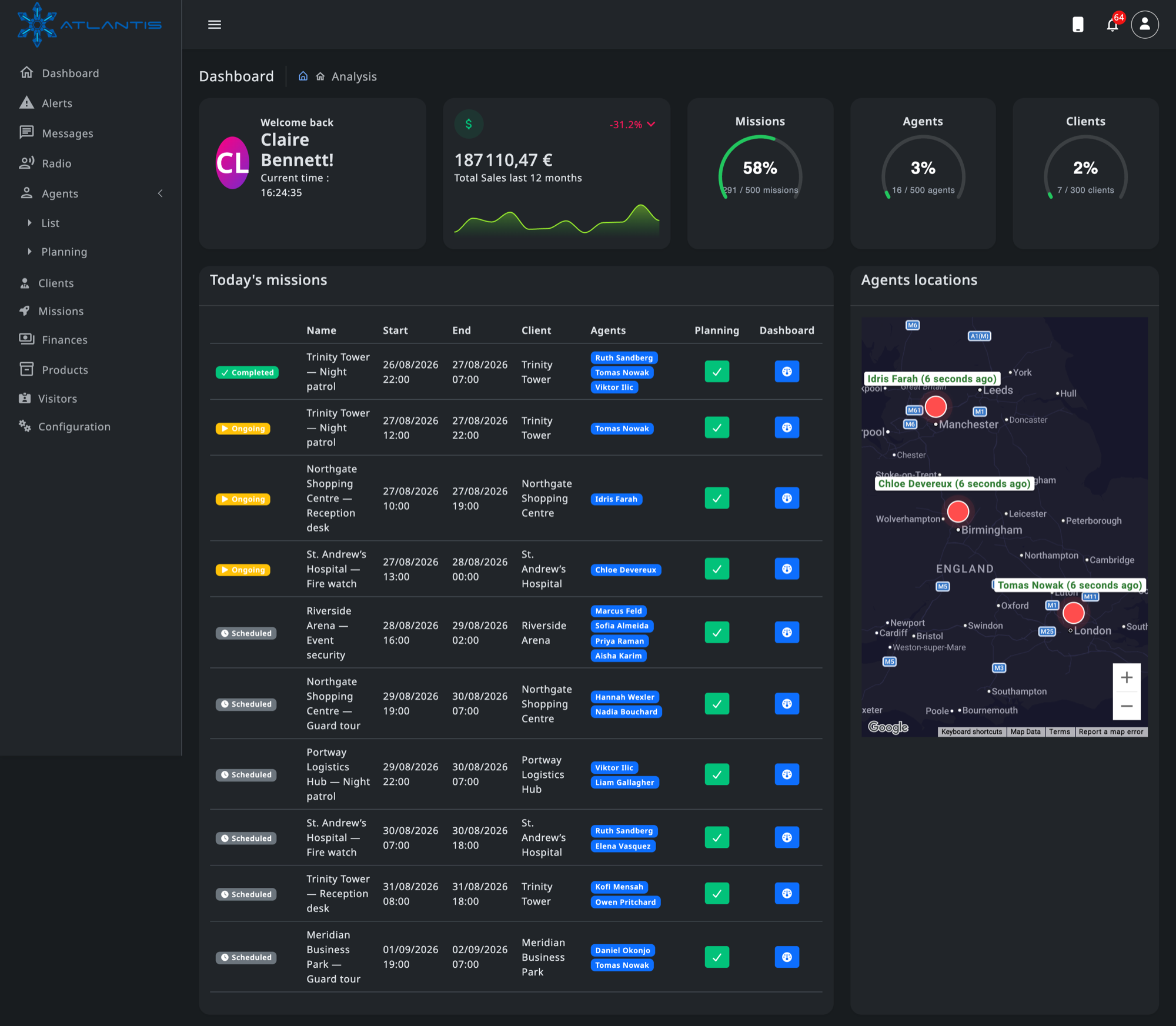
Atlantis — Operations console
Atlantis operations console: today’s missions with their status and assigned agents, live agent positions on a map, subscription quota gauges and twelve-month sales.

The dispatch desk opens on what matters now: which missions are running, who is on them, where those agents are, and what the planning still owes you.
Features

Everything a security company runs on

No add-on modules to chase: mission planning, tracking, communications, reception, billing and reporting are all part of the platform.

rocket_launch

Mission management

Create missions for a client, set the period and hours, attach agents with their role, and split a long assignment into recurring occurrences.

event_repeat

Recurring missions

Pick the days of the week and an end date; Atlantis generates the occurrences in advance following your configured planning horizon.

calendar_month

Planning & shifts

Build the schedule on a calendar view, with guardrails on minimum and maximum hours per day, weekly ceiling and mandatory rest between shifts.

badge

Agent directory

Manage agent profiles, assign mission roles, and bulk import or export your whole roster as a spreadsheet.

business_center

Clients & contacts

Keep client accounts, their sites and their contacts together, and see every mission attached to an account at a glance.

my_location

Live GPS tracking

Positions stream from the mobile app to the map so you always know where each agent is during a mission.

fence

Geofencing

Draw the mission perimeter and get an out-of-bounds alert the moment an agent leaves the zone.

warning

Alerts & escalation

Out-of-bounds and offline-agent alerts land in a prioritised feed, with per-user alert preferences and severity levels.

crisis_alert

SOS & emergencies

One tap on the agent phone broadcasts a geolocated distress signal to every supervisor on duty, with the position on the map.

record_voice_over

Push-to-talk radio

Low-latency voice channels per mission over WebRTC — no radio hardware, no licence, just the phone in the agent pocket.

chat

Team messaging

Real-time chat channels tied to missions and teams, so instructions and photos reach the right people instantly.

meeting_room

Reception & visitors

Log arrivals and departures, register visitors, record deliveries and external interventions, and flag VIP arrivals.

qr_code_scanner

Checkpoint scanning

Agents scan a checkpoint code on their round to prove passage, timestamped and attached to the mission report.

description

Documents & proof

Attach documents and photos to reception events so every entry in the log carries its own evidence.

insights

Reports & dashboards

Mission completion rates, events by hour, activity per agent — with exports when you need to hand a report to a client.

payments

Mission billing

Bill a mission as a negotiated flat fee, or per resource: a sell and a buy rate for every role, plus the options you attach to it.

inventory_2

Product & option catalog

Vehicles, dogs, cameras, night premiums — one catalog with buy and sell prices, billed per agent, per hour or per mission.

savings

Margin you can act on

Revenue, costs and gross margin per mission, client, role and product, so a contract that stopped paying shows up before you renew it.

receipt_long

Nothing delivered for free

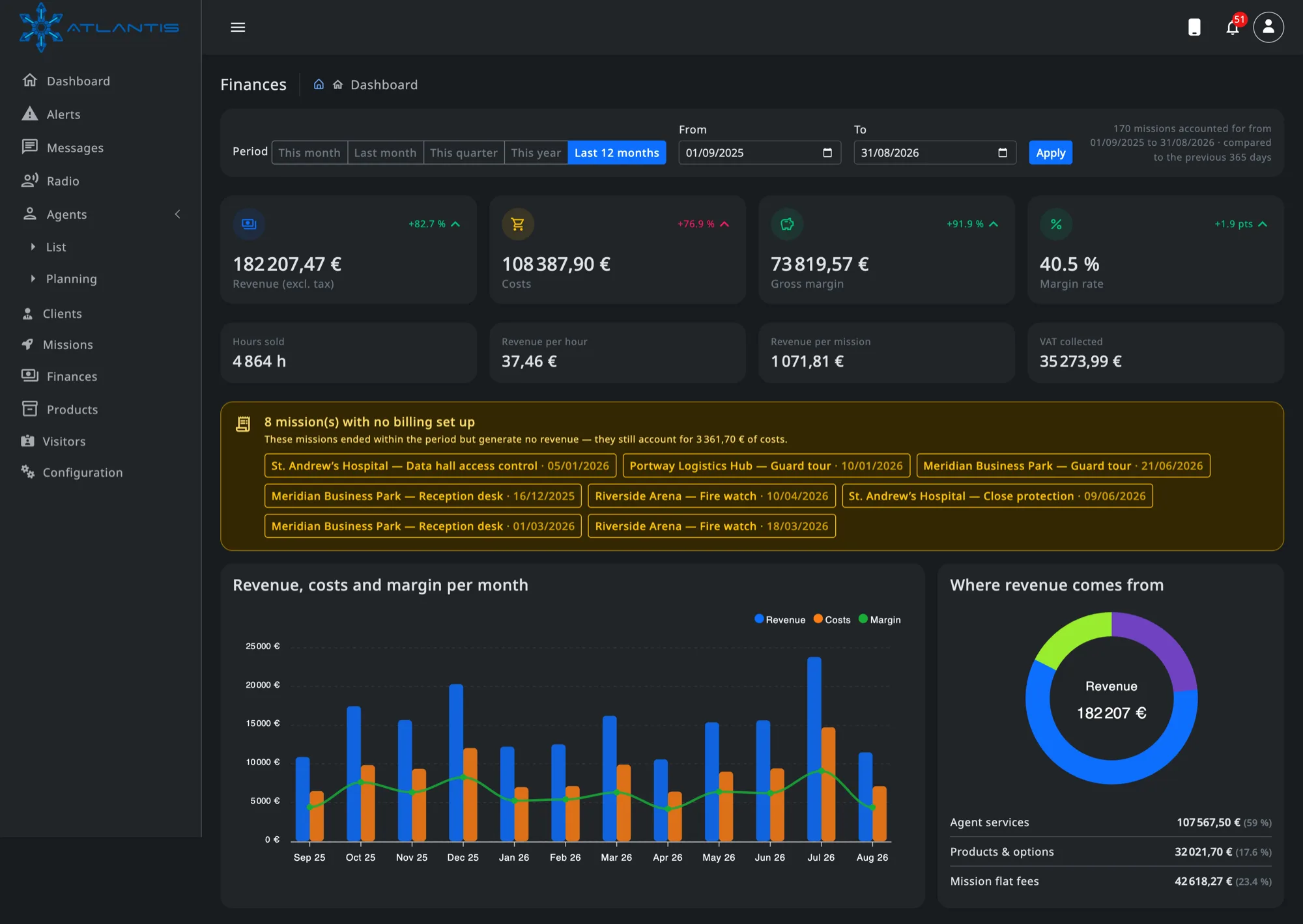
Missions that ended with no billing set up are flagged, together with the costs they are already carrying.

notifications_active

Push notifications

Critical events reach supervisors and agents through push notifications and in-app alerts, not a mailbox nobody reads.

admin_panel_settings

Roles & organizations

Admin, agent and client roles with data scoped to your organization, so each company only ever sees its own operations.

tune

Your operating rules

Set the planning horizon, hour limits and rest periods that match your collective agreement — the platform enforces them.

Mission types

Built around how you actually work

Each mission type comes with its own parameters and its own field workflow on the mobile app.

meeting_room

Office reception

Front desk duty: visitor check-in and check-out, deliveries, external interventions, badge log and VIP handling.

directions_walk

Guard tour

Scheduled rounds with checkpoints scanned on site, so you can prove the tour happened at the agreed times.

videocam

Surveillance

Static or mobile watch over a perimeter, with geofencing, live positions and incident logging.

shield

Protection

Close protection assignments, with a geolocated SOS, live tracking and immediate escalation to the operations room.

Real time

When something happens, you already know

Positions, alerts, messages and radio all travel over persistent websocket connections. No refresh button, no five-minute delay between an incident and the console.

check_circle Instant alerting — out-of-bounds and offline-agent detection raise an alert on the supervisor screen as it happens.
check_circle Geolocated SOS — a distress signal carries the agent coordinates so you can dispatch help immediately.
check_circle Voice over IP — push-to-talk channels connect the operations room to the field without radio infrastructure.
check_circle Shared timeline — every event, scan and message is logged against the mission for the after-action report.
speed

Sub-second events

Websocket delivery for alerts, chat and presence.

wifi_off

Offline resilient

Field actions queue on the phone and sync once back online.

history

Full audit trail

User logs and mission events keep a complete history.

lock

Scoped by org

Every record is isolated to your organization.

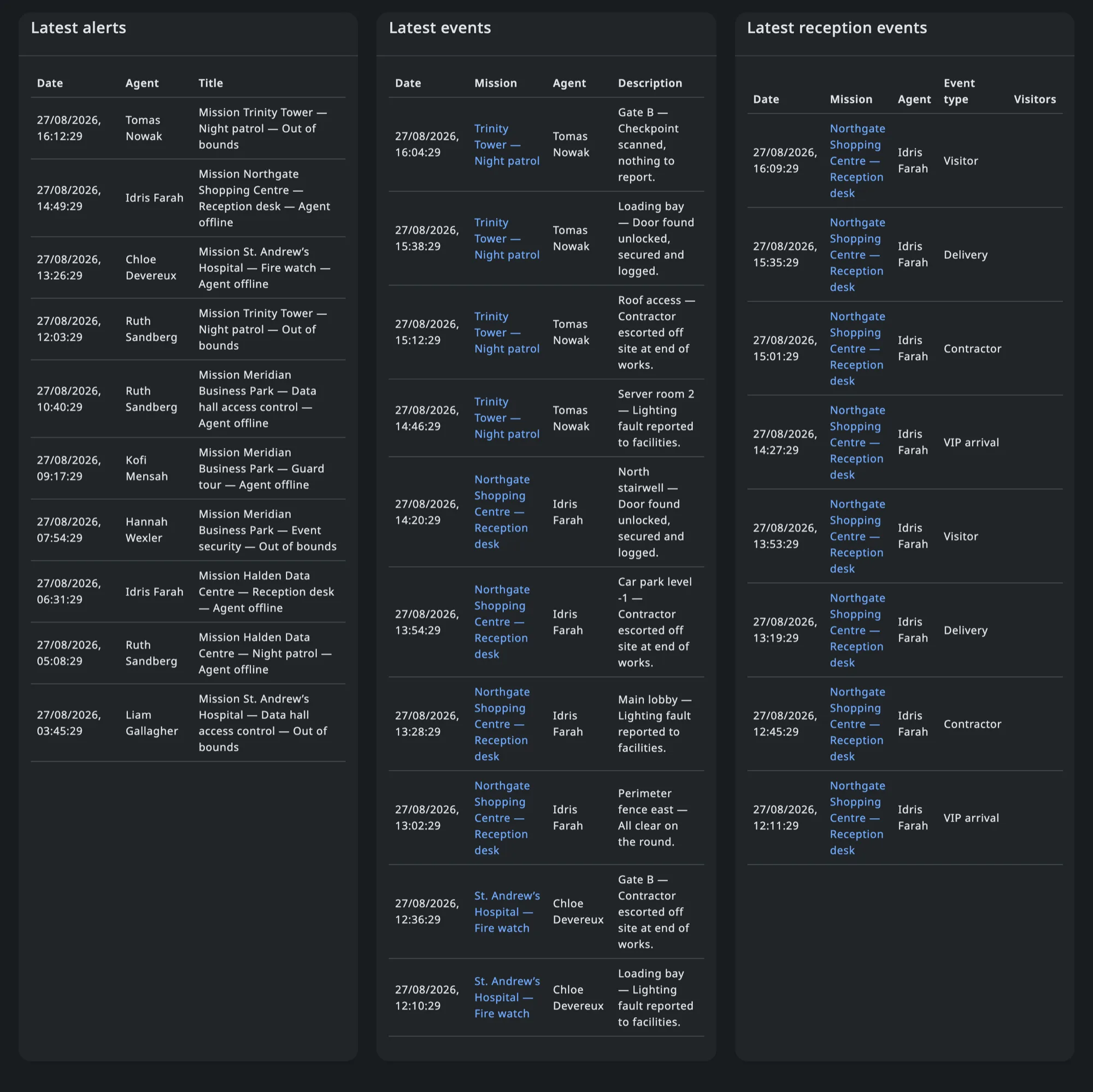
Atlantis — Live feeds
Three live feeds side by side on the console: latest alerts with the agent and mission concerned, latest field events from checkpoint rounds, and latest reception events with their type.

Alerts, field events and reception logs land on the console as they happen, each one carrying the mission and the agent it came from.

Finances

Know what every mission actually earns

Billing lives on the mission itself — a negotiated flat fee, or a rate per role and per option. Atlantis values every assignment against it, so revenue, costs and margin follow your operations instead of waiting for a spreadsheet at the end of the month.

Atlantis — Finances dashboard
Atlantis finances dashboard: revenue, costs, gross margin and margin rate over the last twelve months, missions with no billing set up, and a monthly revenue chart.
query_stats

One period, every figure

Pick a month, a quarter, a year or your own dates: revenue excluding tax, costs, gross margin and margin rate, each compared with the period before.

donut_small

Where revenue comes from

The split between agent services, products and mission flat fees, so you can see which part of the business is actually paying.

groups

Ranked by client and by role

Margin per client and per role, with the sell and buy rate behind every hour, so pricing arguments rest on your own numbers.

trending_down

Missions to watch

Billed missions sorted by the lowest margin rate — the ones sold below cost surface long before the contract comes up for renewal.

Flat fee or per resource — your call

The same mission can be sold as one negotiated price or rebuilt hour by hour from the agents on site and the options attached to it. Either way, the costs stay real.

check_circle Rates negotiated per role — the rate agreed on the mission wins; failing that, the agent’s own hourly or daily rate is used.
check_circle Options priced their own way — a product can be billed once per mission, once per agent, or for every hour worked.
check_circle Is the flat fee still right? — the mission sheet puts your negotiated price next to what the resources are worth, and shows the gap.
check_circle Warnings where it matters — missing rates, incomplete planning or a mission sold below cost are called out on the sheet itself.
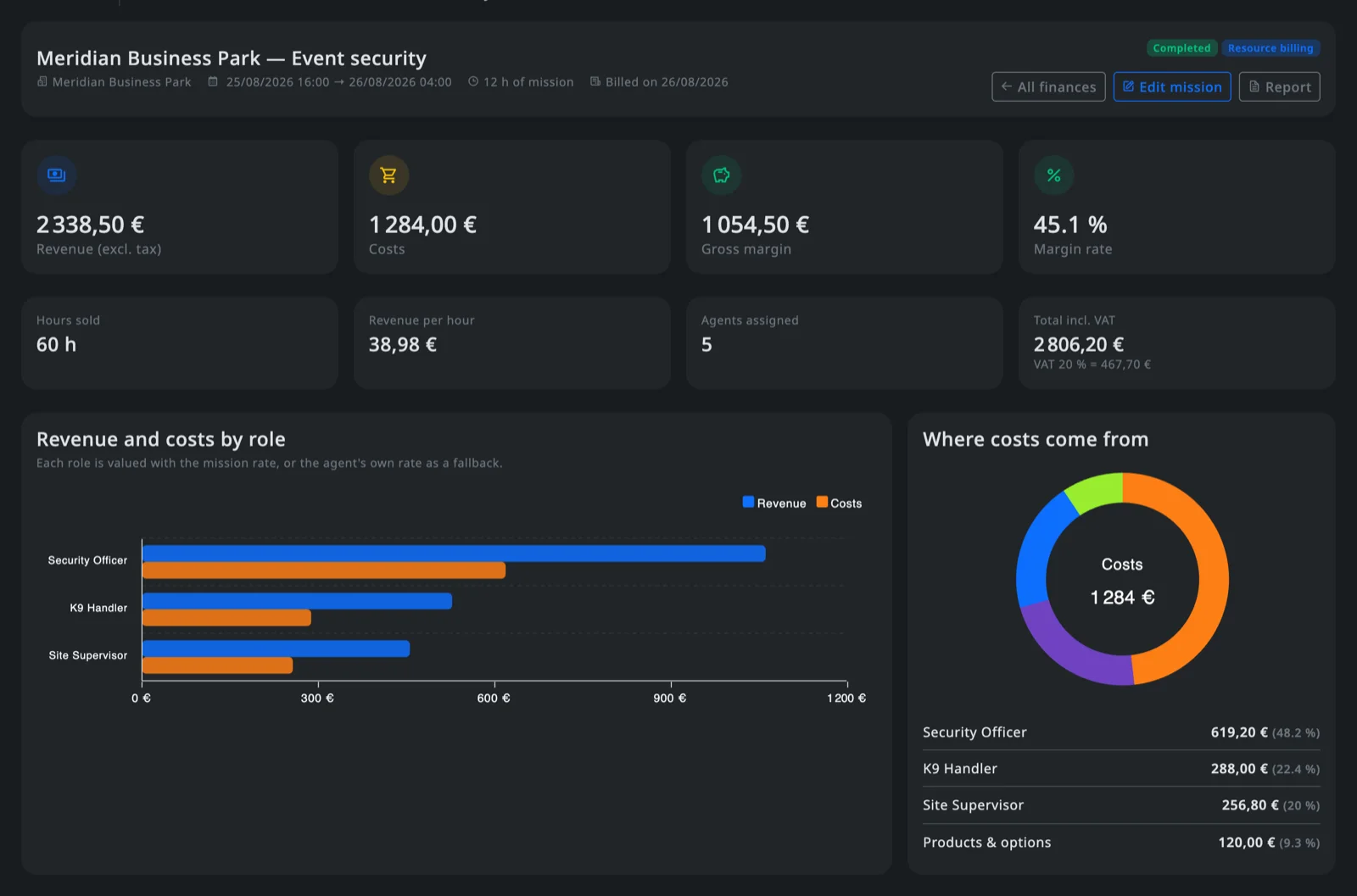
Atlantis — Mission finances
Financial sheet of a single mission: revenue, costs, gross margin, margin rate, hours sold, VAT, revenue and costs by role, and where the costs come from.

Every euro traced back to a shift

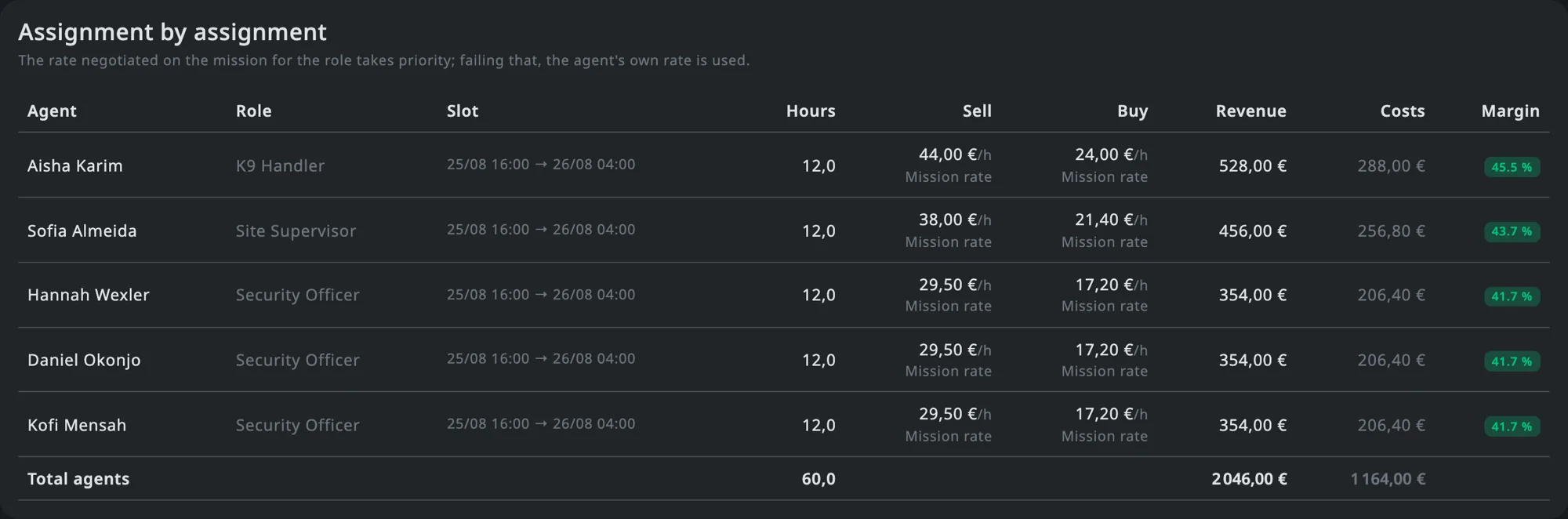
No aggregate you have to take on trust. Each line is one agent on one slot, with the rate that was applied and where it came from — the mission, or the agent’s own profile.

Atlantis — Assignment by assignment
Assignment by assignment table: agent, role, slot, hours, sell and buy rate per hour, revenue, costs and margin for each agent on the mission.
check_circle Hours as they were planned — the slot actually assigned, not the mission window, is what gets valued.
check_circle Margin line by line — you can see which role, and which shift, is the one dragging the mission down.
check_circle The same numbers everywhere — what you read on the mission is exactly what rolls up into the client and role rankings.
On the ground

The whole platform, in the agent’s pocket

Everything a field agent needs during a shift, in one app that keeps working when the network does not.

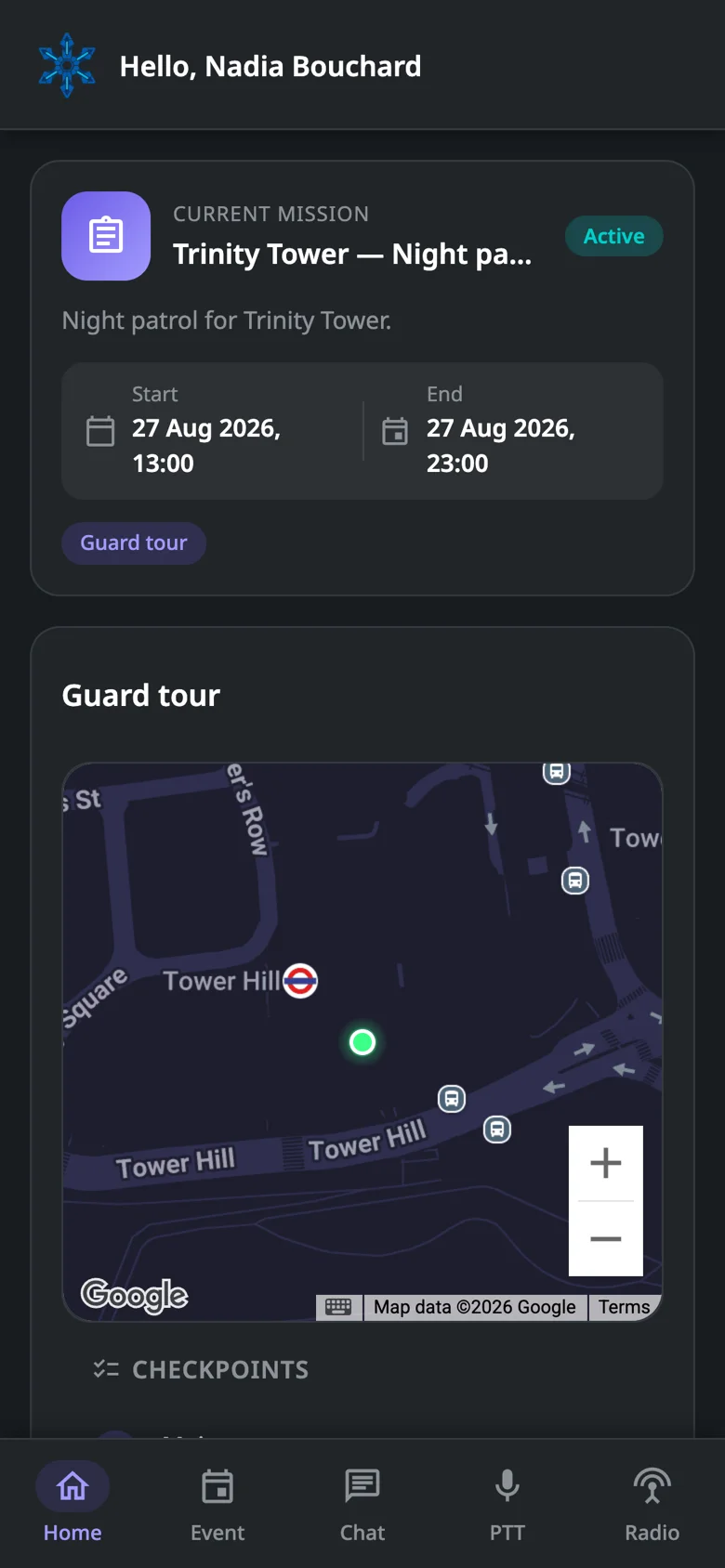
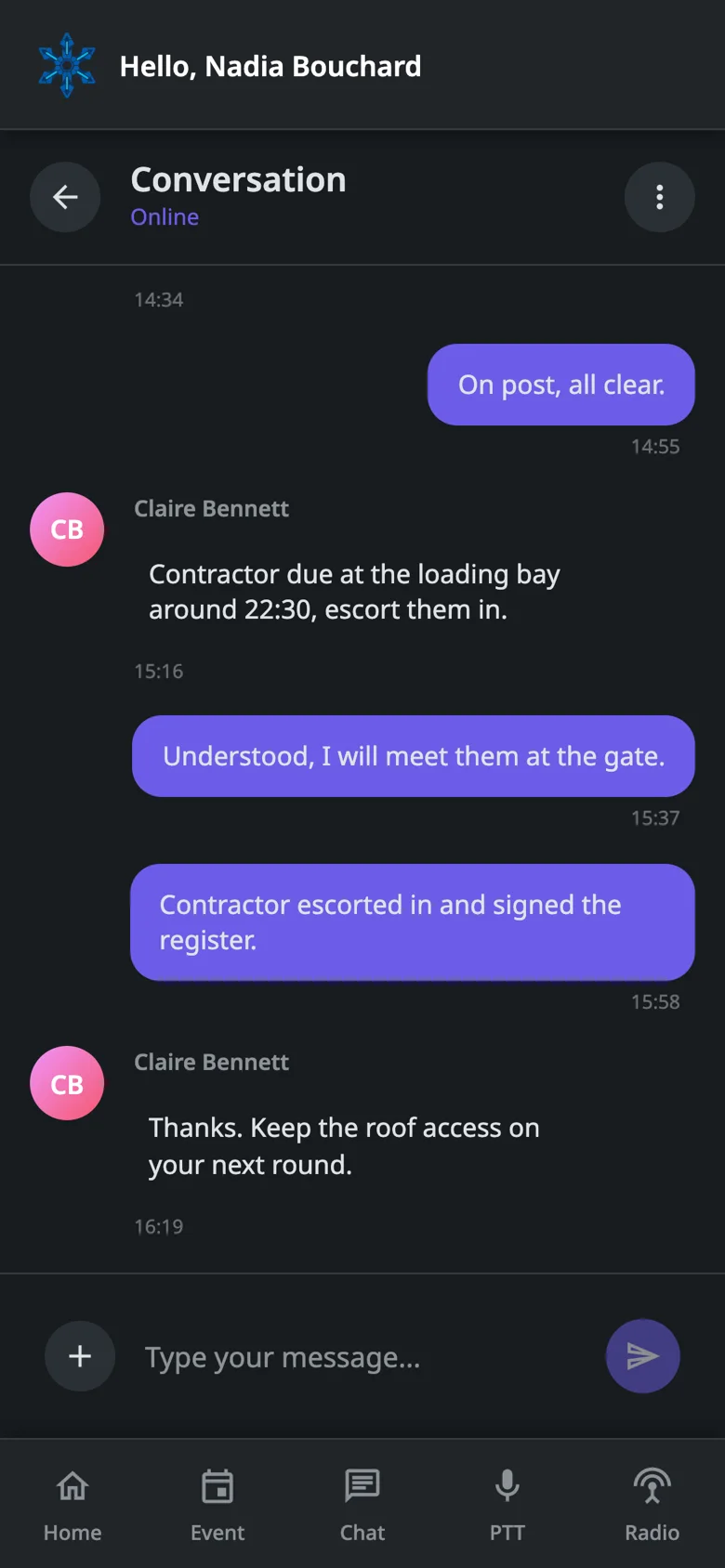
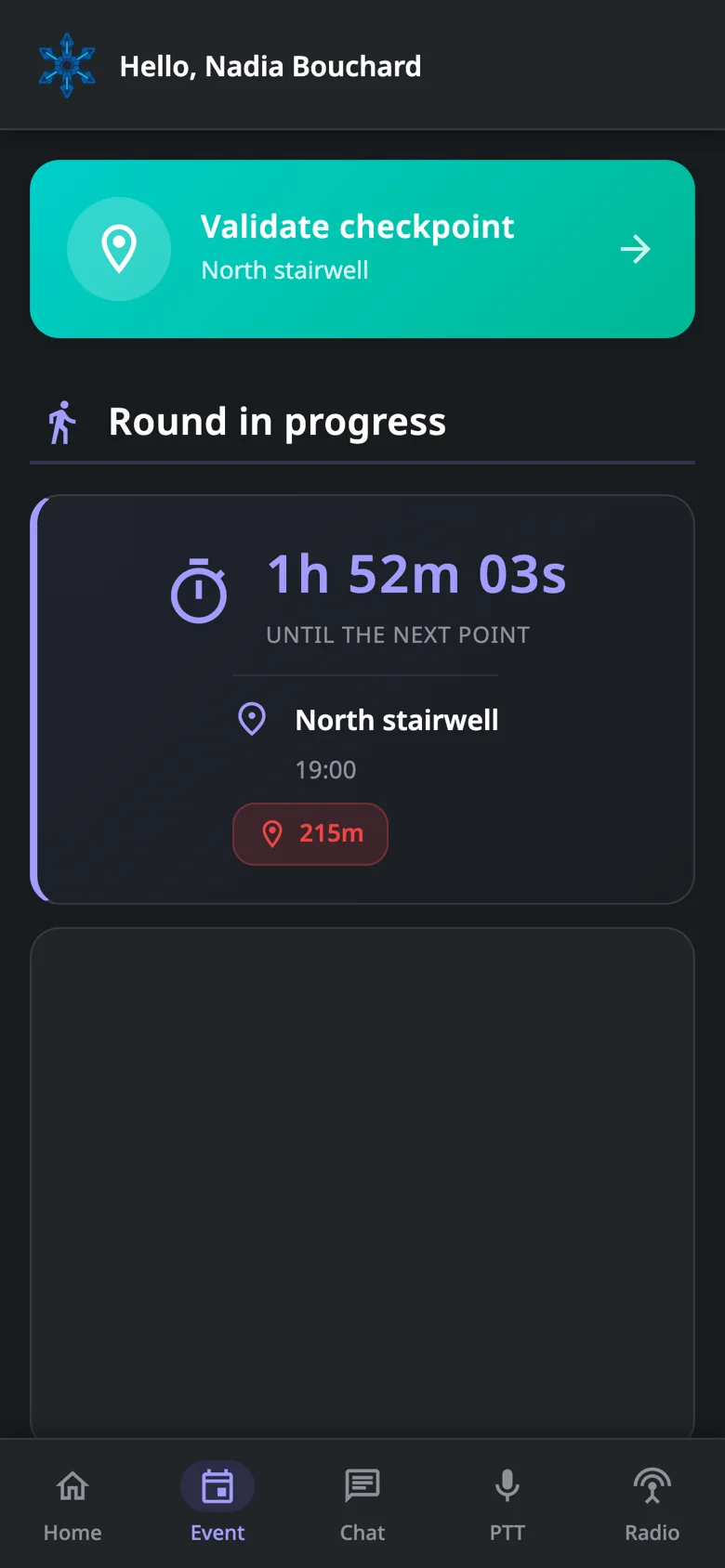
Atlantis mobile app — The shift, on one screen

The shift, on one screen The current mission, its perimeter on the map, the agent’s own position and the checkpoints still to do.

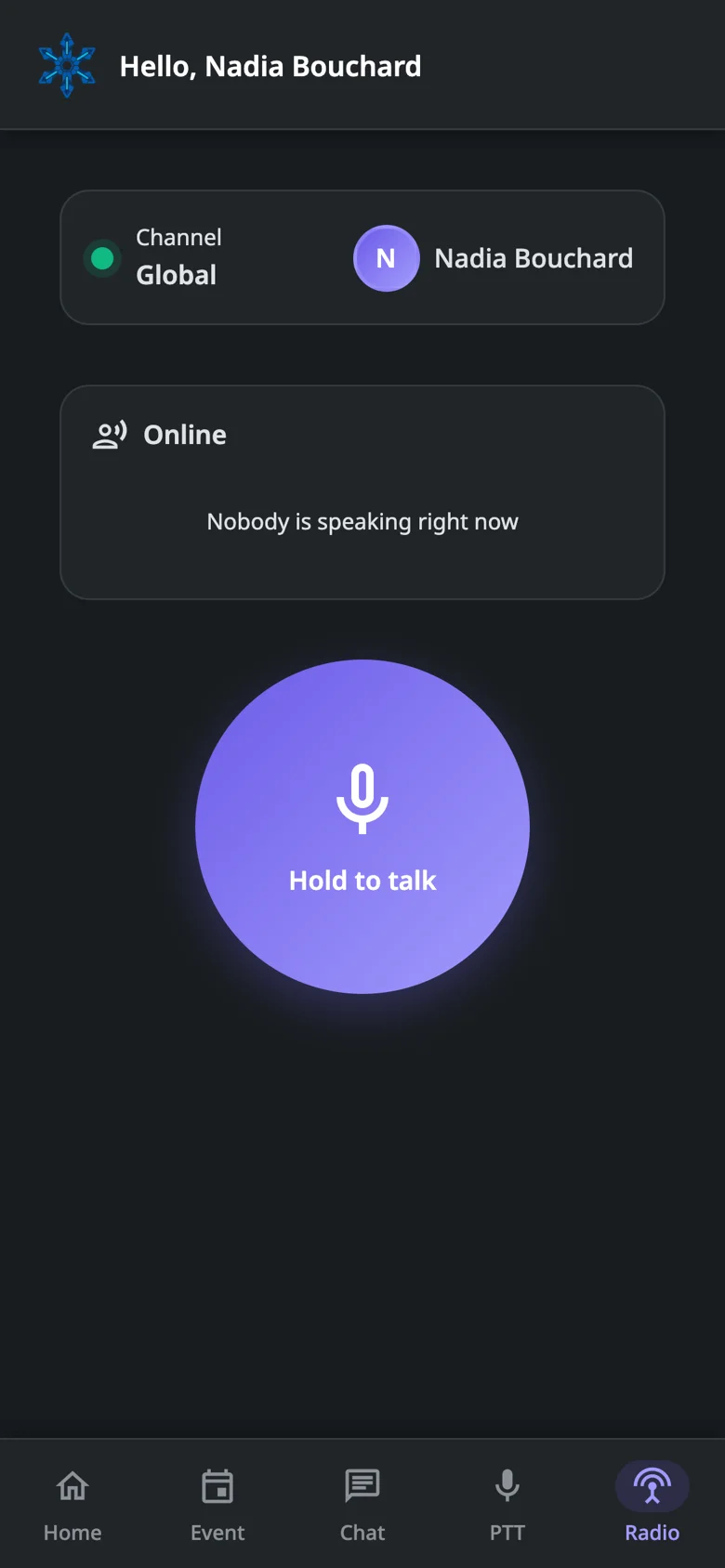
Atlantis mobile app — Push-to-talk radio

Push-to-talk radio Hold to talk on the mission channel — no radio hardware, just the phone already in their pocket.

Atlantis mobile app — A line to the desk

A line to the desk Mission channels carry instructions and photos between the operations room and the field.

Atlantis mobile app — Proof of passage

Proof of passage A checkpoint is validated on site with a photo and a comment, timestamped against the mission.

smartphone

Mobile app for agents

Android & iOS
assignment Today’s missions and briefing on the home screen
qr_code_scanner Scan and validate guard-tour checkpoints
how_to_reg Reception: visitor check-in, deliveries, VIP arrivals
photo_camera Attach photos and documents to any event
record_voice_over Push-to-talk radio and mission channels
forum Direct messaging with the operations room
crisis_alert Geolocated SOS button always within reach
cloud_sync Offline queue: nothing is lost without network
Getting started

Operational in four steps

Atlantis is not open to self-service sign-up: access is granted after we review your request.

1

Request access

Fill in the form with your company details. We review every request and open your organization once it is approved.

2

Add clients and agents

Register your client accounts and invite your agents, or import the whole roster from a spreadsheet.

3

Plan your missions

Create missions, set recurrence and assign agents with their roles — the planner enforces your hour rules.

4

Run operations live

Follow agents on the map, handle alerts, talk over radio, collect the reports your clients ask for — and watch the margin each mission brings in.

Pricing

One plan per stage of growth

Every plan includes the full feature set — missions, planning, tracking, alerts, radio, reception and the mobile app. Plans differ on capacity, and you can top it up with options. Pick the one that fits, then send your access request — we activate it with you.

starter
Starter

The essentials to run a small team: up to 5 missions, 5 clients and 5 agents, with planning, alerts and mobile tracking included. Ideal for getting started on real assignments.

rocket_launch Missions 5
business_center Clients 5
person Agents 5
Request access
entreprise
Entreprise

Built for large operations: up to 500 missions, 300 clients and 500 agents, every feature unlocked, multi-site management and priority support for your critical assignments.

rocket_launch Missions 500
business_center Clients 300
person Agents 500
Request access
add_circle_outline

Need a little more?

Rather than jumping to the next plan, extend the one you are on. Options are added to your subscription and can be removed anytime.

Extra Mission
4,99 €
per month · +1 to your quota
Extra Client
4,99 €
per month · +1 to your quota
Extra Agent
4,99 €
per month · +1 to your quota

Capacity at a glance

Included Starter Pro Entreprise
rocket_launch
Missions
Active assignments you can run in parallel
5 50 500
business_center
Clients
Customer accounts and their sites
5 100 300
person
Agents
Field agents with a mobile account
5 50 500
apps
All platform features
check_circle check_circle check_circle
FAQ

Questions we get asked

No. Atlantis runs in your browser. Once your access request is approved, your team logs in from any machine. Agents install the mobile app on their own phone when you are ready to go on the field.

Atlantis is not open to self-service sign-up. You fill in the access request form with your company details, we review it, and your organization is opened on the plan you picked. You are notified as soon as your access is active.

Plans are sized on three things: the number of missions you run, the number of client accounts you manage, and the number of agents with an account. Everything else — alerts, radio, chat, reception, reports — is included on every plan.

Yes. Options let you add extra missions, clients or agents one at a time on top of your current plan, and remove them when the peak is over.

Yes. Checkpoint scans, reception events and reports are queued on the device and sent automatically as soon as the connection is back, so nothing is lost in a basement or a car park.

No. Push-to-talk runs over the data connection of the phone, with voice channels per mission. If you already use radios, the app simply runs alongside them.

Yes. Each mission carries its own billing setup, and Atlantis values every assignment and every option against it. You get revenue, costs, gross margin and margin rate for that mission, and the same figures aggregated by client, by role and by product over any period you pick.

It does. A mission can be billed as a negotiated flat fee instead of per resource. Costs are still computed from the agents and options actually engaged, and the mission sheet puts your flat fee side by side with what those resources are worth — so you can tell whether the price is still calibrated.

Every mission, client, agent and event is scoped to your organization. Users only ever see the data of the organization they belong to, according to their role.

Yes. Your agent roster imports and exports as a spreadsheet, and mission activity is available as reports you can hand over to your clients.

Ready to see your operation in real time?

Tell us about your company and the plan you need. We review every request and open your organization once it is approved.